
Giving your agent tools with AgentCore Gateway
TL;DR;
How to put AgentCore Gateway in front of an existing Lambda so an agent can call it as an MCP tool, with Cognito issuing the JWT the gateway validates, so the endpoint is authenticated from the first deployment.
SOURCE CODE - All code for this post is available at: https://github.com/levantar-ai/demos/tree/main/agentcore/02-gateway
Longer version
The agent from the first post could only echo. The way agents become useful is tools, and the protocol most of the ecosystem has converged on for them is MCP. The problem is that the systems agents need to reach, your internal APIs, your Lambdas, your SaaS integrations, are not MCP servers and nobody wants to write and host a fleet of them.
That is the job of AgentCore Gateway. You point it at things you already have (Lambdas, OpenAPI specs, API Gateway stages) and it presents them to agents as a single MCP server, handling the protocol, the auth and the tool schemas. The agent sees a list of tools, the gateway routes each call to the right backend.
This post puts a gateway in front of one Lambda, an order lookup, and has the agent from post 01 answer order questions with it:
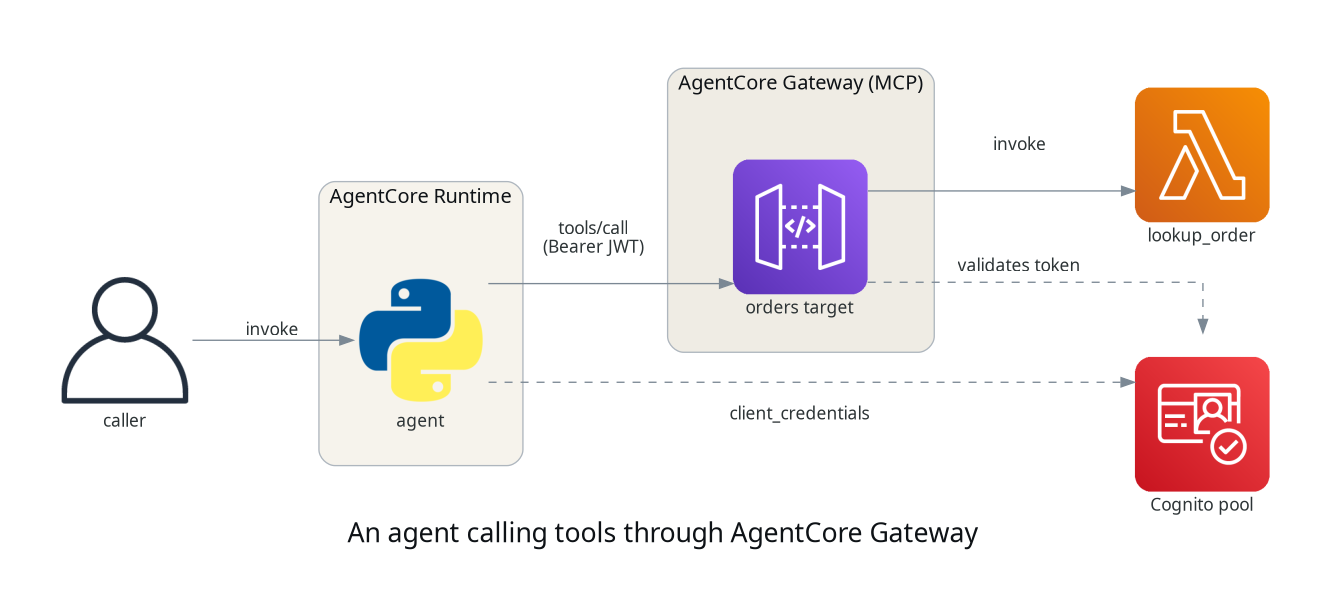
1 - The tool
The backend is a plain Lambda, no MCP anywhere in it. It takes an order id and returns what it knows:
ORDERS = {
    "42": {"status": "shipped", "carrier": "DPD", "eta": "2026-07-28"},
    "43": {"status": "picking", "carrier": None, "eta": "2026-07-30"},
    "44": {"status": "delivered", "carrier": "Royal Mail", "eta": None},
}

def handler(event, context):
    order_id = str(event.get("order_id", ""))
    order = ORDERS.get(order_id)
    if order is None:
        return {"error": f"order {order_id} not found"}
    return order
The gateway invokes it with the tool arguments as the event, so a Lambda
that already takes its inputs as top-level event fields and returns JSON
needs no changes. A Lambda written for another event shape, API Gateway
style body and pathParameters for example, would need an adapter.
2 - Auth in front of the gateway
The gateway supports three authorizer types, CUSTOM_JWT, AWS_IAM and
NONE. This demo uses CUSTOM_JWT against a small Cognito pool, so the
gateway validates a bearer token on every call and the endpoint is never
open. The agent is a machine with no human behind it, so it uses the
client_credentials grant and reads its client secret from Secrets Manager
with its execution role.
That is deliberately all the identity this post carries. Agent identity, end-user delegation and outbound OAuth so the agent can act on someone's behalf get their own post later in the series, which builds on this pool rather than repeating it. One thing worth holding until then, every call here carries the same workload identity, so the gateway establishes that a legitimate client is calling, not that it is entitled to a particular order.
NOTE:
authorizer_typeis immutable. A gateway created withNONEcannot be upgraded later, it has to be replaced, so it is worth starting authenticated even for a demo.
3 - The gateway and its target
The gateway side is two resources, the gateway itself which is the MCP endpoint plus its authorizer, and a target which maps a backend into the tool list:
resource "aws_bedrockagentcore_gateway" "orders" {
  name            = "demos-agentcore-02-gateway-gw"
  role_arn        = aws_iam_role.gateway.arn
  protocol_type   = "MCP"
  authorizer_type = "CUSTOM_JWT"

  authorizer_configuration {
    custom_jwt_authorizer {
      discovery_url   = "https://cognito-idp.${region}.amazonaws.com/${pool_id}/.well-known/openid-configuration"
      allowed_clients = [aws_cognito_user_pool_client.agent.id]
      allowed_scopes  = aws_cognito_resource_server.orders.scope_identifiers
    }
  }
}

resource "aws_bedrockagentcore_gateway_target" "orders" {
  gateway_identifier = aws_bedrockagentcore_gateway.orders.gateway_id
  name               = "orders"

  credential_provider_configuration {
    gateway_iam_role {}
  }

  target_configuration {
    mcp {
      lambda {
        lambda_arn = aws_lambda_function.tool.arn

        tool_schema {
          inline_payload {
            name        = "lookup_order"
            description = "Look up the status of an order by its order id"

            input_schema {
              type = "object"

              property {
                name        = "order_id"
                type        = "string"
                description = "The order id to look up"
                required    = true
              }
            }
          }
        }
      }
    }
  }
}
The tool schema you declare here is what agents will see over MCP, so it all matters, the name, description and input schema are what a model uses to decide when to call the tool and how to shape the arguments.
Asking the gateway for its tool list, with curl and a client-credentials
token, shows the mapping in action:
{
  "jsonrpc": "2.0",
  "id": 1,
  "result": {
    "tools": [
      {
        "name": "orders___lookup_order",
        "description": "Look up the status of an order by its order id",
        "inputSchema": {
          "type": "object",
          "properties": {
            "order_id": {
              "description": "The order id to look up",
              "type": "string"
            }
          },
          "required": ["order_id"]
        }
      }
    ]
  }
}
The runtime role gets one extra permission, to read the client secret and nothing else, least privilege in its clearest form, one action on one resource:
{
  Sid      = "ReadClientCredentials"
  Effect   = "Allow"
  Action   = ["secretsmanager:GetSecretValue"]
  Resource = aws_secretsmanager_secret.agent_client.arn
}
The gateway's own role is the same shape, one action on one Lambda ARN. The full policies, and where they are looser than that sentence suggests, are in the repo.
NOTE: the gateway namespaces tool names as
<target>___<tool>(triple underscore), solookup_orderon theorderstarget becomesorders___lookup_order. Resolve that fully qualified name exactly, two targets can expose tools with the same short name and a fuzzy match will happily pick the wrong one.
4 - Teaching the agent to call it
The agent uses the official MCP Python SDK, the mcp package, pinned at
mcp==1.29.0. Because the gateway takes a bearer token there is nothing
gateway-specific about the client at all, it is the SDK's stock streamable
HTTP transport with an Authorization header:
from mcp import ClientSession
from mcp.client.streamable_http import streamablehttp_client

async def _call_tool(order_id):
    headers = {"Authorization": f"Bearer {access_token()}"}
    async with (
        streamablehttp_client(os.environ["GATEWAY_URL"], headers=headers) as (read, write, _),
        ClientSession(read, write) as session,
    ):
        await session.initialize()
        result = await session.call_tool(TOOL_NAME, {"order_id": order_id})
        return result.content[0].text
No signing code, no JSON-RPC to assemble, no handshake to remember, the SDK
does the protocol. access_token() is the standard client_credentials
exchange against Cognito, cached until shortly before it expires, and the
secret behind it comes from Secrets Manager. That agent invokes a tool name
it already knows rather than discovering one, because the tool path is the
thing on show here, not tool selection.
There is still no model in this agent, it extracts an order id from the prompt with a regex, because the thing under demonstration is the tool path, not the reasoning. This transport and client become one part of a model-driven tool loop later in the series, which also needs tool selection, result handling, retries, limits and a view on prompt injection.
5 - Asking it questions
aws bedrock-agentcore invoke-agent-runtime \
  --cli-binary-format raw-in-base64-out \
  --agent-runtime-arn "$RUNTIME_ARN" \
  --runtime-session-id "$SESSION_ID" \
  --payload '{"prompt": "where is order 42?"}' response.json

cat response.json
{"result": "order 42: {\"status\":\"shipped\",\"carrier\":\"DPD\",\"eta\":\"2026-07-28\"}"}
The agent never parses that itself. It asked the gateway for a tool, the gateway invoked the Lambda, and the answer came back through the same bearer-token path every call takes.
The tool handles the miss case the same way:
"is order 99 ok?" -> {"result": "order 99: {\"error\":\"order 99 not found\"}"}
The gateway endpoint is public, so it is worth checking that the
authorizer is actually doing something. Use a tools/call rather than a
tools/list for this, because tools/list never reaches a backend even
when it succeeds, so rejecting one proves less than it looks. This is the
request that would invoke the Lambda:
curl -s -o /dev/null -w "HTTP %{http_code}\n" -X POST "$GATEWAY_URL" \
  -H "Content-Type: application/json" \
  -d '{"jsonrpc":"2.0","id":1,"method":"tools/call",
       "params":{"name":"orders___lookup_order",
                 "arguments":{"order_id":"42"}}}'
no token:      HTTP 401
bogus token:   HTTP 401
Rejected before the Lambda is invoked. That is the whole reason for setting this up now rather than later, the endpoint was authenticated before it ever answered anything.
Conclusion
One Lambda and two gateway resources turned a plain function into an MCP tool an agent can discover and call, without writing or hosting an MCP server, and a Cognito pool put a validated bearer token in front of it so the endpoint was never open. The client stayed a stock MCP client, which is the point, the auth is a header. The same target mechanism scales sideways, more Lambdas, OpenAPI specs or API Gateway stages all join the same tool list behind the same endpoint. Note what that means for access though, the scopes and allowed clients are set on the gateway, not per target, so a token the gateway accepts can reach every tool behind it. Tools with different trust boundaries want separate gateways, or checks in their own backends.
The next post gives the agent somewhere to keep what it learns, short-term session context and long-term extracted memory with AgentCore Memory. Agent identity proper, end-user delegation and outbound OAuth build on the pool set up here.
References:
- https://github.com/levantar-ai/demos/tree/main/agentcore/02-gateway
- https://docs.aws.amazon.com/bedrock-agentcore/
- https://registry.terraform.io/providers/hashicorp/aws/latest/docs/resources/bedrockagentcore_gateway
- https://docs.aws.amazon.com/cognito/latest/developerguide/cognito-user-pools-app-idp-settings.html
- https://modelcontextprotocol.io/