
Letting an agent run code, without letting it run loose
TL;DR;
How to give an agent a real Python sandbox with AgentCore Code Interpreter, put a file in, run code over it, read the result back, and what the sandbox does and does not have access to.
SOURCE CODE - All code for this post is available at: https://github.com/levantar-ai/demos/tree/main/agentcore/04-builtin-tools
Longer version
This series is building one thing, the order support agent for Brightwell, a small online retailer of outdoor kit that ships with DPD and Royal Mail. Posts 01 to 03 gave it a runtime, a tool that looks orders up and memory. This post gives it somewhere to run code.
It is a mechanism post, and it is worth saying what that means. The agent here is a Python handler. There is no language model in it, the routing is code, and the sandbox gets called because the handler calls it. A later post hands a model these tools to choose from for itself, and that is where the sandbox earns its place, because the code it runs will have been written by a model in answer to a question nobody wrote code for. This post is the plumbing that has to work first.
The plumbing matters because of where code runs. Parsing a file you did not produce with pandas inside your agent's own process puts a parser you did not write, working on data you do not control, right next to your credentials. Execute model-generated code there and the exposure is worse again. AgentCore Code Interpreter is a managed sandbox for exactly this. Your agent writes files into a session, runs code there, and reads results back as text. This post wires one up, runs something deliberately plain in it, and then pokes at the walls.
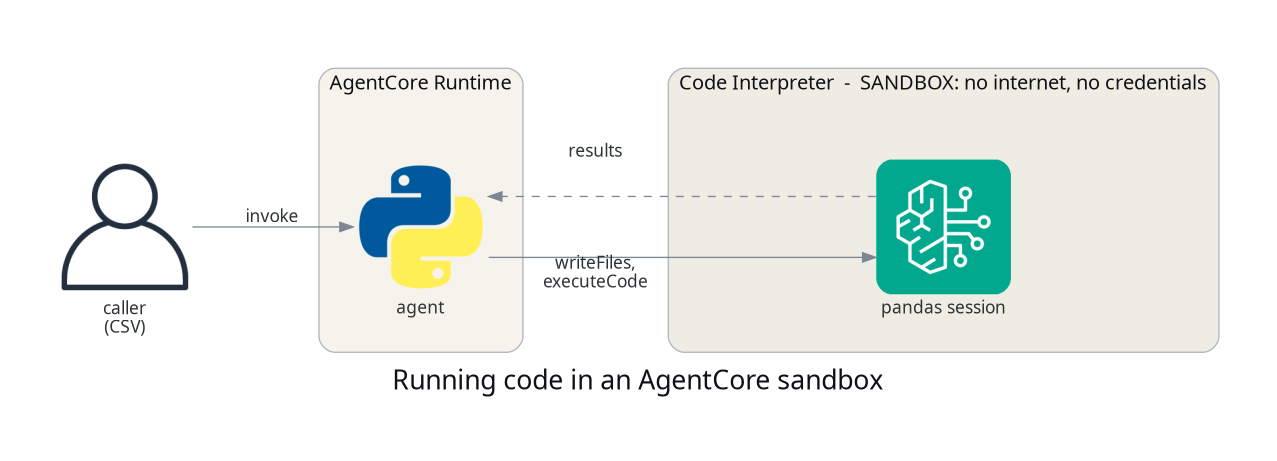
1 - The sandbox
One resource, and the network mode is the control this post turns on:
resource "aws_bedrockagentcore_code_interpreter" "sandbox" {
  name        = "demos_agentcore_04_interpreter"
  description = "Sandboxed pandas analysis for the demos series"

  network_configuration {
    network_mode = "SANDBOX"
  }
}
SANDBOX means the session gets no outbound internet access. The other
option is PUBLIC, which gives the sandbox outbound internet access, and
you want
to be deliberate about choosing it, because that is the mode where code
running in the session could reach the network on its own. The threat is
the code that executes, whether you wrote it or a model did, not the CSV
sitting on disk.
NOTE:
SANDBOXis the egress control, not the whole boundary. IAM decides who can start and invoke a session, you decide what data goes into one, and your agent decides what comes back out to the caller. Isolating the network does not make everything in the session safe to return.
The runtime role gets the three actions the agent actually calls, scoped to this one sandbox:
{
  Sid    = "CodeInterpreter"
  Effect = "Allow"
  Action = [
    "bedrock-agentcore:StartCodeInterpreterSession",
    "bedrock-agentcore:InvokeCodeInterpreter",
    "bedrock-agentcore:StopCodeInterpreterSession"
  ]
  Resource = aws_bedrockagentcore_code_interpreter.sandbox.code_interpreter_arn
}
2 - The agent
The agent's job is to move the file in, run code, and read the result out. It never parses the file itself:
def _call(session_id, name, **arguments):
    response = client().invoke_code_interpreter(
        codeInterpreterIdentifier=os.environ["CODE_INTERPRETER_ID"],
        sessionId=session_id,
        name=name,
        arguments=arguments,
    )
    return _consume(response)

def write_files(session_id, path, text):
    return _call(session_id, "writeFiles", content=[{"path": path, "text": text}])

def execute_code(session_id, code, language="python"):
    return _call(session_id, "executeCode", code=code, language=language)

def analyse(csv_text, session_id):
    write_files(session_id, "data.csv", csv_text)
    return execute_code(session_id, ANALYSIS)
ANALYSIS is a string of pandas, describe() and a row count. It is
deliberately dull. The post is about where it runs, not what it computes,
and anything cleverer would be a story dressed up as a demo.
Every tool goes through one generic call, invoke_code_interpreter, which
takes a tool name and an arguments blob rather than a method per tool. That
is the shape of an MCP tools/call, the same protocol the Gateway spoke in
post 02, and it exists so an agent can forward a model's tool choice
straight through without a dispatch table. The useful names are
writeFiles, executeCode, executeCommand, readFiles and listFiles.
This agent's code is fixed, so it gains nothing from the dynamic shape and
wraps the two tools it uses as functions with named parameters. That also
puts the stream handling in one place. Responses arrive as an event stream,
and a tool that fails sets isError inside that stream rather than raising,
so _consume reads the whole stream and then raises if any event set
isError. Skip that and a failed run looks exactly like a successful empty
one.
Sessions are the thing to be careful with, because one lives until its
timeout whether or not you are still using it. The agent opens a session,
works in it, and stops it in a finally so a failed run cleans up too:
def session_for(interpreter, name):
    resp = client().start_code_interpreter_session(
        codeInterpreterIdentifier=interpreter,
        name=name,
        sessionTimeoutSeconds=900,
    )
    return resp["sessionId"]

session_id = None
try:
    session_id = self.start(interpreter, "analysis")
    self._send(200, {"result": self.run(csv_text, session_id)})
finally:
    if session_id is not None:
        self.stop(interpreter, session_id)
That is the shape. The real handler also turns any failure into a 502 and
wraps the stop in its own try, so a cleanup error never masks the result.
NOTE: files land in the session's working directory, not in
/tmp. Write todata.csvand readdata.csv, and resist the urge to be clever with absolute paths.
NOTE: sessions outlive the call that created them, up to
sessionTimeoutSeconds, and a sandbox with live sessions refuses to delete (ConflictException: ... cannot be deleted. There are 2 active sessions), so stop sessions rather than waiting them out.
3 - Running something
The file is eight of Brightwell's orders for one customer, a slice of the
dataset the series shares from here on, generated by
scripts/make_orders.py so it is the same every time:
python3 -c 'import json; print(json.load(open("payload.json"))["csv"])'
# order_id,placed_at,items,total
# 1014,2026-01-12,3,125.00
# 1074,2026-02-20,4,45.95
# 1090,2026-03-07,3,142.60
# ...
# 1275,2026-08-01,3,174.80

aws bedrock-agentcore invoke-agent-runtime \
  --cli-binary-format raw-in-base64-out \
  --agent-runtime-arn "$ARN" \
  --runtime-session-id analysis-session-000000000000000001 \
  --payload file://payload.json \
  --region us-east-1 /dev/stdout \
  | python3 -c 'import sys,json; print(json.JSONDecoder().raw_decode(sys.stdin.read())[0]["result"])'
The CLI writes the response body and then its own metadata to the same stream, hence the decoder that stops at the end of the first object.
          order_id     items       total
count     8.000000  8.000000    8.000000
mean   1159.750000  2.500000   95.387500
std     102.264014  1.069045   53.037781
min    1014.000000  1.000000   43.800000
25%    1086.000000  1.750000   45.450000
50%    1157.500000  3.000000   91.500000
75%    1249.500000  3.000000  132.400000
max    1275.000000  4.000000  174.800000

rows: 8
Computed in the sandbox, from a file the agent never opened, by code the agent never ran in its own process. That is the whole of what this post demonstrates. What makes it worth having is the next section.
Pandas was already present in the sandbox image at the time of writing, so there was no dependency management to do for straightforward analysis. That is an observation about the managed image rather than a documented contract, so check what you actually need is there before you depend on it.
4 - Testing the walls
The interesting part is what happens when code in the sandbox tries to
reach out. Running this inside a SANDBOX session:
import urllib.request
urllib.request.urlopen("https://example.com", timeout=8)
blocked: URLError <urlopen error [Errno -2] Name or service not known>
One failed request is an illustration, not a proof. The guarantee to
design against is the documented SANDBOX behaviour, which
is that the session has no outbound internet egress. What you get is code
running on untrusted data with no outbound route to the internet. What the
session hands back still travels through your agent, so what reaches the
caller stays your decision.
Conclusion
A managed sandbox lets an agent run code on data it did not produce
without that code running next to its credentials, and it does it with one
Terraform resource, three IAM actions and a couple of API calls, with
SANDBOX as the egress control and IAM, session lifecycle and what you
return to the caller making up the rest of the boundary.
Nothing in this post decided to use the sandbox. The handler called it. That is the right place to start, because the lifecycle, the stream handling and the walls all have to be understood before a model is let anywhere near them. A later post in the series hands a model the tools it has built, the order lookups, memory and this sandbox, and asks it a question nobody wrote code for. That is when the sandbox runs code a model wrote, which is the case it exists for.
The next post gives the agent an identity at both ends, inbound authentication so it knows which customer is calling, and its own credentials held by AgentCore Identity rather than in its code.
References: