
Who and what does what in an AI system
TL;DR;
Not so long back, we were talking to a few people at a client who each had a slightly different picture of AI agents. So we drew a shared one, showing how assistants, agents, runtimes, tools and services fit together. It's high level on purpose. Think of it as a rough guide, not a spec, and add your own topics as you go.
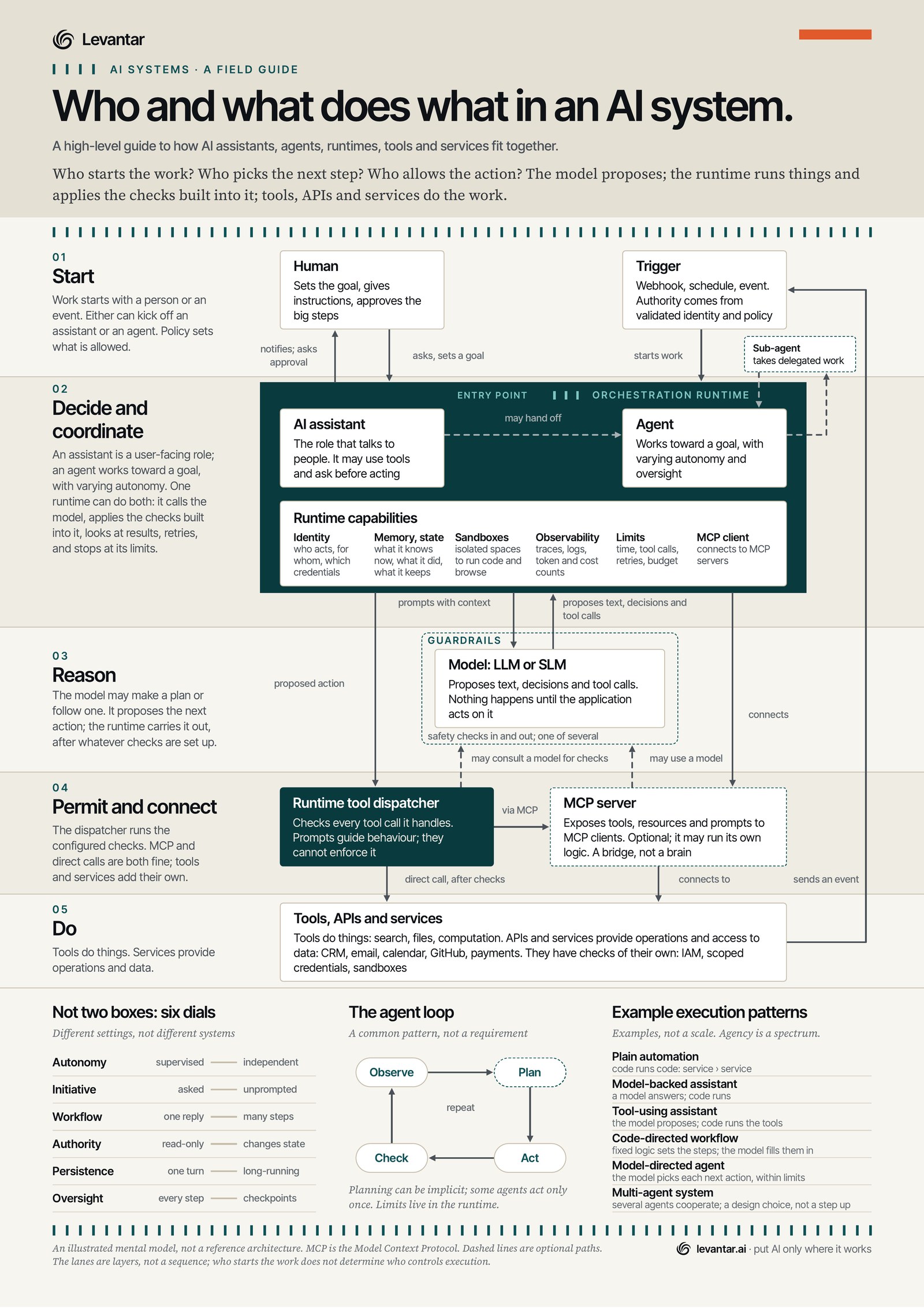
This one started with a chat. We were talking to a few people at a client about AI agents, and it didn't take long to notice that each of them had a slightly different picture of the same thing. What they didn't have was a shared picture to point at, something high level that roughly explains how the pieces talk to each other, and that you can add other topics to later without starting again.
So we drew one. It's a single A3 page, and it's meant as a rough guide, not a spec.
Three questions first
Conversations about agents tend to go round in circles when they start from definitions, so the sheet starts from three questions instead. Who starts the work? Who picks the next step? Who allows the action? The short answer is at the top. The model proposes. The runtime runs things and applies the checks built into it. Tools, APIs and services do the work. Everything else hangs off that, in five lanes.
The five lanes, quickly
Start. Work kicks off with a person or an event, like a webhook or a schedule. A trigger is just a start signal. Whatever it's allowed to do comes from validated identity and policy, not from the trigger itself.
Decide and coordinate. This is the orchestration runtime, the bit that often gets left off the whiteboard, and it can support both patterns. An assistant is the one that talks to people, and it may use tools and ask before acting. An agent works towards a goal, with varying autonomy and oversight. The runtime calls the model, applies its checks, looks at the results, retries, and stops at its limits. The band also lists what a runtime can bring with it, such as identity, memory and state, sandboxes, observability, limits, and an MCP client if you're using MCP. If those look familiar, our AgentCore series builds several of them on AWS, one post at a time.
Reason. The model, large or small, proposes text, decisions and tool calls, and nothing happens until the application acts on them. It may make a plan or follow one. Guardrails check what goes in and what comes out, and they're one check among several, not the whole story.
Permit and connect. This is the lane that got the most attention in review. The runtime tool dispatcher checks every tool call it handles. Prompts guide behaviour, but they can't enforce it, so enforcement sits in the runtime, the tools and the services. MCP is an optional way to reach tools. An MCP server can run its own logic, but it's a bridge, not a brain. Direct calls after the checks work too.
Do. Tools search, work with files and compute. APIs and services provide operations and access to data, like your CRM, email, calendar, GitHub and payments, and they bring checks of their own, like IAM, scoped credentials and sandboxes.
The dashed lines are the optional paths. An assistant may hand off to an agent, an agent may delegate to a sub-agent, the dispatcher may consult a model for its checks, and an MCP server may use a model. When something needs a person, the runtime notifies them and asks for approval, and a service can send an event that starts the next piece of work.
A quick example
Say a customer asks an assistant where their order is. The model works out that it needs the order and proposes a tool call to look it up. The runtime checks the call is allowed for this customer, the tool fetches the order from the order system, and the model writes the reply. Now say the customer asks for a refund. That changes state, so it might need more permissions, or a person to approve it, before the refund goes through.
Six dials instead of two boxes
Is it an assistant or an agent? That's the question that goes round in circles the most, so the sheet doesn't try to settle it with a table. It uses six dials instead. Autonomy, from supervised to independent. Initiative, from asked to unprompted. Workflow, from one reply to many steps. Authority, from read-only to changing state. Persistence, from one turn to long-running. Oversight, from every step to checkpoints.
So assistant and agent aren't two different kinds of system. The same customer support assistant could be read-only and supervised at every step in one place, and changing state over many steps with checkpoints in another. Different settings, not different systems.
The loop, and a few examples
Observe, plan, act, check, repeat. Plenty of agents run that loop and it's a handy picture, but it isn't a test of whether something counts as an agent. Planning can be implicit, some agents only act once, and either way the limits live in the runtime.
The last block gives six example execution patterns, from plain automation where code runs code, through model-backed and tool-using assistants and code-directed workflows, to a model-directed agent and a multi-agent system. They're examples, not a ladder. Multi-agent is a design choice, not a step up, and the plainer pattern is often the right one.
A base to build on
The sheet was never meant to cover everything. It's an illustrated mental model, not a reference architecture. The lanes are layers, not a sequence, and who starts the work doesn't determine who controls execution. What it gives you is a rough shared picture of how the pieces interact, so a group of people can start from the same place. From there you can add the topics that matter to you, such as security, evaluation, cost or a particular platform, and go deeper on each one without redrawing the basics.
Have the conversation with us
If this sounds like a conversation you've been having, we'd be happy to have it with you. If you're working out where agents would pay in your business, and what has to be true before you trust one with real work, the Agent Readiness Session is a good place to start. Agent System Design covers what each agent owns, how work passes between them and where a person stays in the loop. An MCP Server Build lets your agents reach your systems inside your own controls, and an AI Security Review assesses where your AI estate is exposed, what evidence you'd have if something went wrong, and what to fix first.
Download the poster. It's a free A3 PDF, vector throughout. Stick it on the wall, scribble on it, add your own lanes. And if you think we've drawn something wrong, tell us and we'll put it right.